

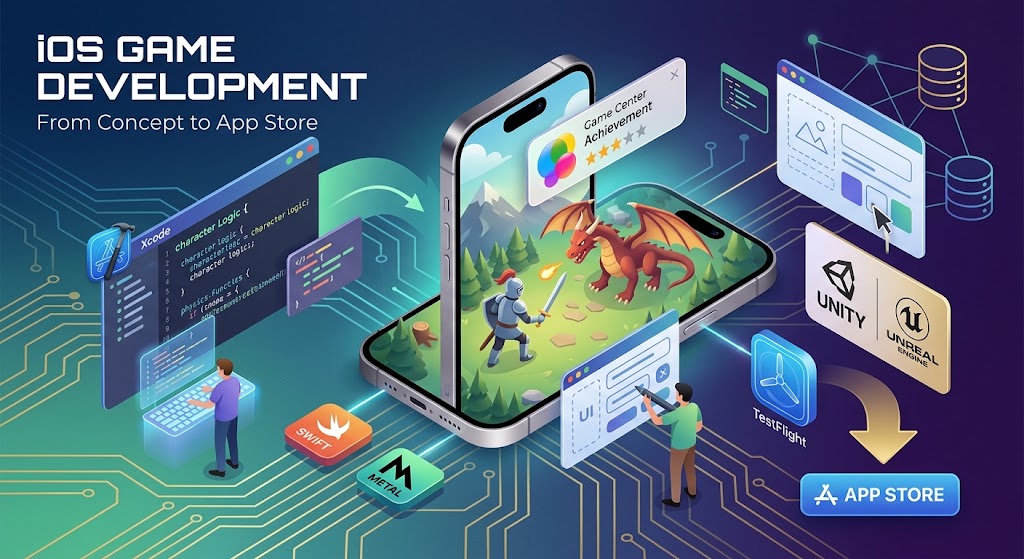
iOS Game Development: From Concept to the App Store
Creating games for Apple hardware is one of the most exciting and financially rewarding paths you can take as a creator. Millions of active users pick up their iPhones and iPads every single day looking for fresh entertainment, engaging puzzles, and immersive multiplayer adventures. If you have a solid idea floating around in your mind, there has never been a better moment to build it.
The mobile platform provides a cohesive, reliable, and highly profitable marketplace. Apple users statistically spend more money on software purchases, in-game items, and digital subscriptions than users on competing platforms. That financial reality makes iOS game development a smart long-term investment for indie developers and established studios alike.
Building a top-tier title takes far more than raw passion alone. You need a deep understanding of modern programming frameworks, rendering pipelines, user experience design, player retention, and hardware performance tuning. Let us walk through every critical stage you need to master to turn your ideas into polished digital realities.
Starting out can feel overwhelming because the ecosystem offers so many options. You might wonder whether you should build everything natively using Apple software or rely on a third-party engine like Unity. The key is breaking down your goals early and matching them with the right tools for your skill level.
Why iOS Game Development Is Worth Your Time and Energy
Apple controls both the software operating system and the physical silicon chips running inside every handheld device. That tight hardware integration creates a wonderfully predictable development environment. You do not have to spend hundreds of hours testing your project against thousands of fragmenting hardware configurations.
Instead, you design for a refined portfolio of devices powered by custom Apple Silicon chips. These processors deliver exceptional graphic efficiency and raw computing power. Beyond hardware advantages, the unified App Store ecosystem gives you immediate global distribution and built-in secure payment processing across hundreds of regions worldwide.
Here is why so many creators prioritize this ecosystem for mobile titles:
- Consistently higher average revenue per paying user across key international consumer markets
- Direct access to hardware-accelerated graphics via Apple’s proprietary Metal rendering engine
- Predictable hardware specifications across iPhone and iPad families that simplify performance tuning
- Free, world-class developer tools like Xcode available directly on macOS hardware
- Smooth integration with social features like Game Center for leaderboards and achievements
- Robust beta testing tools like TestFlight to gather feedback before official release
When you build with performance in mind, players notice instantly. High frame rates, responsive touch feedback, and fluid menu navigation make all the difference between an immediate deletion and an app that stays installed for years.
The ecosystem also offers flexibility in how you design your software architecture. You can build lightweight 2D experiences that launch instantly, or complex 3D worlds featuring real-time lighting and custom physics. Your limits are defined only by your creative effort and technical discipline.
Core Tools and Frameworks for iOS Game Development
Every successful production starts with selecting the proper technical stack. Apple provides powerful native frameworks out of the box, but third-party game engines dominate much of the commercial market. Choosing the right path depends on your graphics requirements, team size, and target platforms.
| Framework / Engine | Primary Language | Best Suited For | Learning Curve |
|---|---|---|---|
| SpriteKit | Swift | 2D Arcade & Casual Puzzles | Beginner |
| SceneKit | Swift | Casual 3D & Light Physics | Intermediate |
| Unity | C# | 2D & 3D Cross-Platform Games | Intermediate |
| Unreal Engine | C++ / Blueprints | High-End 3D & Realistic Visuals | Advanced |
| Godot | GDScript / C# | Lightweight 2D & Open-Source 3D | Beginner to Intermediate |
If you aim to build a lightweight 2D puzzle title or simple action game exclusively for Apple devices, native Swift paired with SpriteKit is remarkably efficient. It loads fast, uses minimal system RAM, and preserves device battery life exceptionally well. However, if you plan to launch on Android, Windows, or consoles later, cross-platform engines like Unity remain the industry standard.
Do not get stuck endlessly comparing options during early planning. Pick the software engine that fits your current programming comfort level and start building small test projects immediately. The core fundamentals of level design, collision detection, and user input carry over regardless of what software you choose.
Organizing a clear workflow early on prevents costly mistakes later in production. Here is a practical roadmap you can follow from your first line of code to a full launch:
- Download and install Xcode on your Mac computer and configure your developer profile credentials
- Prototype your primary gameplay loop using simple geometric blocks before creating full visual assets
- Implement touch controls and refine motion responsiveness using direct hardware testing
- Import final visual artwork, particle systems, background music, and localized user interfaces
- Profile system performance on older physical devices to eliminate frame drops and memory spikes
- Distribute early builds through TestFlight to collect feedback and crush software bugs
Following a structured production plan ensures you finish projects rather than abandoning them halfway through. Keep your early scope realistic so you can cross the finish line and publish your work.
Understanding Technical Terminology and Architecture
As you study tutorials and read technical manuals, you will encounter terms unique to mobile graphics and Apple software architecture. Getting comfortable with these terms early helps you navigate technical problems with confidence.
| Term | Category | Definition & Technical Function |
|---|---|---|
| Metal | Graphics API | Apple’s low-overhead API for direct GPU acceleration and maximum visual rendering efficiency. |
| Xcode | IDE | The official integrated development environment used to compile, debug, and package Apple software. |
| TestFlight | Distribution | An integrated beta distribution service for sharing pre-release builds with external testers. |
| Game Center | Social Network | Apple’s native platform for player profiles, global leaderboards, achievements, and multiplayer match-making. |
| Core Animation | UI Rendering | High-performance animation engine used for smooth menu transitions and interface elements. |
Understanding how these components interact makes software architecture much easier to plan. Metal directly communicates with GPU hardware, Xcode compiles your project assets, TestFlight handles beta feedback, and Game Center handles player retention and online leaderboards.
Balancing graphical beauty with thermal performance is one of the biggest challenges in mobile software design. Mobile phones do not have active cooling fans like desktop computers. If your game overworks the hardware, the device will heat up quickly and throttle performance down to cool off.
Here are several proven development habits that help professional creators build polished, performant titles:
- Profile your game regularly using Xcode Instruments to detect memory leaks and heavy CPU tasks early
- Compress texture sheets and audio files intelligently to keep download package sizes small
- Design user interface layouts with dynamic screen margins to support various camera cutouts and notch shapes
- Implement robust game save features so state persists smoothly during incoming calls or battery warnings
- Optimize render passes by batching draw calls and culling invisible objects out of the main camera view
Small touches add up to create a premium experience. When your controls feel tight, menus respond instantly, and battery consumption remains reasonable, players stay connected to your work much longer.
Monetization planning should also happen during early game design rather than as an afterthought right before launch. Will you offer your title as an upfront premium purchase, or build around free-to-play systems with optional in-app purchases? Alternatively, subscription offerings like Apple Arcade provide consistent revenue for curated titles free of advertisements.
Think carefully about what fits your core player demographic. Casual puzzle players generally accept rewarded video ads, while competitive strategy players expect cosmetic customization options and content passes. Match your business mechanics with how people actually play your title.
Finally, do not underestimate the power of marketing and App Store Optimization. Having incredible gameplay means very little if prospective players cannot find your store page. Craft clear screenshots, record compelling gameplay preview videos, and write concise descriptions that highlight what makes your project unique.
Frequently Asked Questions
What Programming Languages Are Used for iOS Game Development?
Swift is the main native programming language used when building directly with Apple frameworks like SpriteKit and SceneKit. If you choose third-party game engines such as Unity, you will write your game logic in C#. Developers working with Unreal Engine write code in C++ or utilize visual scripting via Blueprints.
Do I Need a Mac for iOS Game Development?
Yes, having a computer running macOS is necessary for compiling, signing, and uploading apps to the App Store. Xcode runs only on macOS software. Even if you use cross-platform tools like Unity on a Windows PC, you will still need access to a Mac or a cloud-based macOS build service to create the final executable file for release.
How Much Does It Cost to Launch an iOS Game?
Enrolling in the official Apple Developer Program costs ninety-nine US dollars per year, which unlocks TestFlight distribution and store submission rights. Development software like Xcode, Unity, and Godot can be used for free initially. Overall project costs scale based on art assets, sound production, marketing expenses, and backend server infrastructure.
Can I Use Unity for iOS Game Development?
Yes, Unity is one of the most widely adopted game engines for mobile creators around the world. It exports clean Xcode project files that can be built and deployed straight to physical iPhones and iPads. A massive percentage of top-grossing titles on the App Store are created using Unity.
How Long Does It Take to Build an iOS Game?
Development timelines depend heavily on scope, visual complexity, and team size. A single developer creating a simple 2D casual game might finish in two to three months. In contrast, complex 3D titles with online multiplayer systems often require several years of work from a dedicated studio team.
How Do I Monetize My Mobile Game on the App Store?
You can generate revenue through upfront paid app downloads, in-app purchases for digital goods, recurring membership subscriptions, or video ad placements. Many developers blend rewarded video ads with optional cosmetic purchases to create a fair experience for non-paying users while monetizing core fans.
What Is Apple Metal and Why Does It Matter?
Metal is Apple’s high-performance graphics framework designed to give developers direct access to the device GPU. It removes layer overhead and increases frame rendering efficiency while preserving device battery life. Popular game engines automatically utilize Metal when deploying projects to iOS hardware.
Entering the mobile space is an endlessly rewarding journey filled with creativity and continuous learning. Focus on making your core mechanics genuinely fun, test relentlessly on actual devices, and refine your work based on real player feedback. With persistent effort and the right tools, your title can become the next big hit on the App Store.





Leave a Reply